How to Choose the Right Hardware Parts for Your Projects?
Choosing the right hardware parts is crucial for project success. In a rapidly evolving tech industry, more organizations rely on quality components. According to recent data from the Electronic Industry Association, improper hardware selection costs businesses over $200 billion annually. This emphasizes the need for careful consideration.
When selecting hardware parts, factors such as compatibility and performance must be prioritized. Each component directly impacts the overall functionality of a project. A mismatched part can lead to failures, delays, and increased costs. Yet, many builders rush this decision, often overlooking essential specifications. This can derail even the most promising initiatives.
Armed with reliable insights, decision-makers can avoid common pitfalls. Leveraging expertise and industry trends helps in making informed choices. Balancing budget constraints with quality is key. Always reconsider past selections to improve future outcomes. A reflective approach can lead to better hardware choices, ultimately enhancing project viability.

Understanding Your Project Requirements and Goals
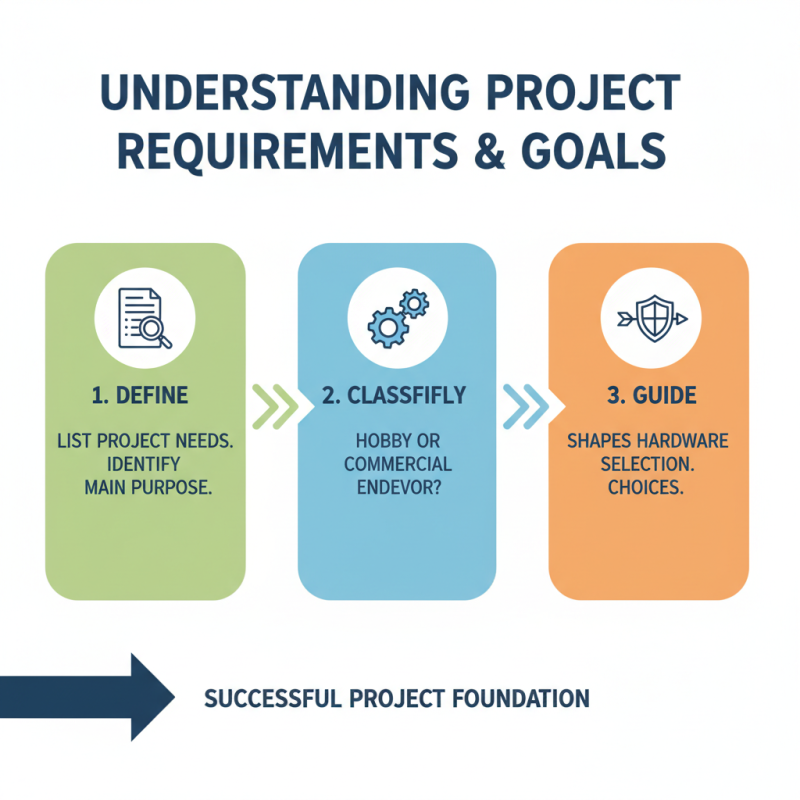
When embarking on any project, it’s crucial to clearly understand your requirements and goals. This foundation shapes your successful hardware selection. Begin by listing your project needs. Identify the main purpose of your project. Is it a hobby or a commercial endeavor? Knowing this will guide your choices.
For instance, if you're building a simple electronic device, prioritize basic components like microcontrollers and sensors. Consider the compatibility of these parts. Avoid overcomplicating things with unnecessary features. This can lead to confusion and wasted resources.
**Tips:**
Define your budget clearly. Sticking to a budget prevents impulse buys. Focus on essential parts first. It’s easy to get distracted by advanced features, which may not be necessary.
Thoroughly research specifications and reviews before making decisions. Reading various perspectives helps ensure you are well-informed. Mistakes can happen, and oversights might occur. Reflecting on past experiences can improve your future choices. Aim for a balance between functionality and cost-effectiveness to achieve your goals effectively.
Identifying Compatible Hardware Components for Your System
When selecting hardware components, compatibility is paramount. Studies indicate that over 50% of project delays are due to incompatible parts. Designers often overlook critical specifications. For example, matching the CPU socket type with the motherboard is essential for functionality. Without this, systems simply won’t operate.
Understanding standards is equally important. The IEEE has established various protocols, yet many still choose incompatible interfaces. For instance, using DDR4 RAM in a DDR3 motherboard results in immediate failure. This mismatch can lead to costly mistakes. Accurate assessments can save projects from budget overruns.
It's also crucial to consider potential upgrades. Many users select components based solely on current needs. This short-sighted view may lead to compatibility issues later. Future-proofing your system can enhance longevity and performance. Research shows that planning for future upgrades can improve system efficiency by up to 30%.
Evaluating Performance Specifications of Hardware Parts
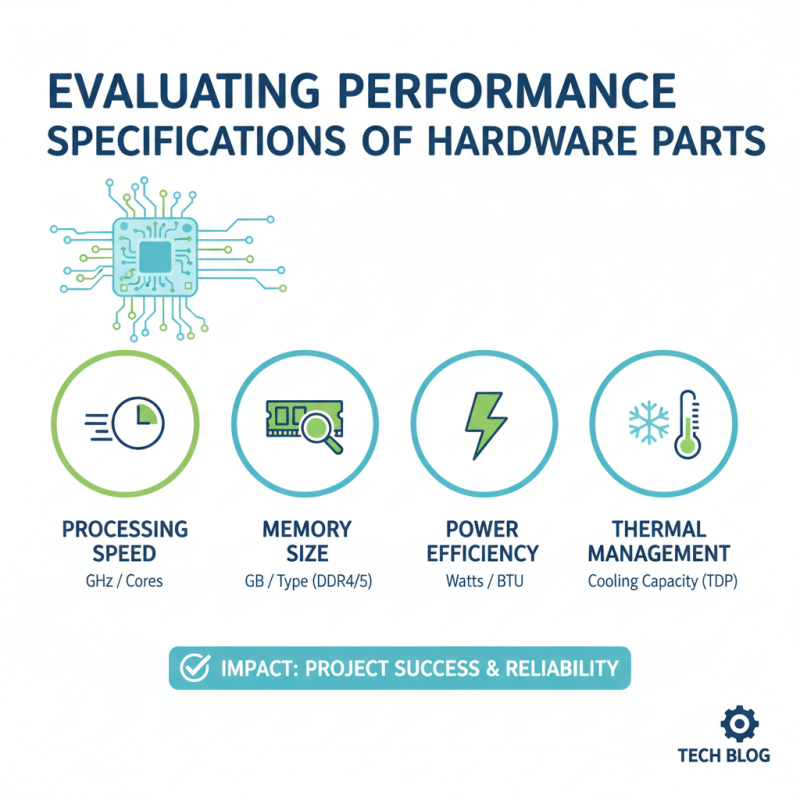
When selecting hardware parts for your projects, understanding performance specifications is crucial. Specifications detail how components will perform in real-world scenarios. Key metrics include processing speed, memory size, power efficiency, and thermal management. These factors can significantly impact the overall success of your project.
Tips: Focus on processing speed when choosing CPUs. Higher clock speeds mean better performance during demanding tasks. Evaluate memory size too. More RAM allows for smoother multitasking and efficient handling of large datasets.
Pay attention to compatibility as well. Not all parts work seamlessly together. Check specifications to ensure proper integration. However, don’t overlook the importance of cooling systems. Effective thermal management can prolong the lifespan of your hardware. A poorly designed setup can lead to overheating issues, limiting performance.
Carefully weighing these specifications can guide you to suitable hardware choices. Reflect on how these components impact functionality. Small mistakes can lead to big setbacks in performance. Aim for a balanced approach that meets the needs of your specific project.
Considering Budget Constraints and Cost-Effectiveness
Choosing hardware parts requires careful consideration, especially regarding budget constraints. A tight budget doesn’t mean sacrificing quality. Instead, focus on the essential features needed for your project. Research various components and compare their prices. Sometimes, spending a little more on a reliable part can save future costs on repairs or replacements.
When evaluating options, look for cost-effective solutions. Explore secondhand or refurbished parts. They can be less expensive while still meeting your project’s requirements. Ensure you check the condition and reliability before purchasing. Don't overlook warranties offered on used items.
**Tips:** Always set a clear budget. This will guide your choices and help avoid impulse buys. Additionally, prioritize the parts that impact performance most. It’s okay to spend less on aesthetics if functionality is your primary concern. Reflect on past projects to anticipate what you might need. This can help in making informed choices amidst budget limitations.
How to Choose the Right Hardware Parts for Your Projects? - Considering Budget Constraints and Cost-Effectiveness
| Component |
Description |
Price Range |
Recommended Use |
| CPU |
Central processing unit. Determines system performance. |
$100 - $400 |
Gaming, Workstations |
| GPU |
Graphics processing unit. Essential for rendering graphics. |
$150 - $700 |
Gaming, Video Editing |
| RAM |
Random access memory. Affects multitasking ability. |
$35 - $150 |
General Use, Gaming |
| SSD |
Solid state drive. Faster data access compared to HDDs. |
$50 - $300 |
Boot Drive, General Storage |
| Motherboard |
Main circuit board. Connects all components. |
$70 - $300 |
General Use, Custom Builds |
| Power Supply |
Supplies power to all components. Reliability is key. |
$50 - $200 |
All Systems |
Researching Brands and Reviews for Reliable Quality
When selecting hardware parts for your projects, conducting thorough research is vital. Begin with brand reputation. Reliable brands often have a track record of quality products. Look for brands that consistently receive high ratings. Reviews from previous users offer insights into performance and durability. They can help you avoid poor-quality parts that may lead to project failure.
Tips: Pay attention to user experiences. Genuine reviews provide details that specifications may overlook. Take note of common issues mentioned. This will guide your choices more effectively. Furthermore, consider expert opinions. Professionals in hardware often share their thoughts in blogs or forums. These perspectives can deepen your understanding of which brands are worth your investment.
Balancing cost and quality can be tricky. Lower-priced items may seem appealing but may not offer the longevity needed. Higher-priced items do not always guarantee better performance. Finding that middle ground is essential. Gather all your insights before making a decision. Reflect on what you’ve learned. The more information you gather, the more confident you'll feel in your choices.